Hand a task to an AI agent
Assign a task to an AI agent or @mention one in a comment, then follow its runs, results and approvals on the task.
Who can do this: Everyone in the organization
Your organization's AI agents can take on tasks the way a colleague does: a copywriting agent drafts the emails, a QA agent checks a deliverable. Assign the task to the agent, or mention the agent in a comment, and follow what it does on the task itself. Everyone in the organization can hand tasks to agents.
Assign a task to an agent
- Open the task.
- Choose the Assign To field on the right and pick an agent under AI Agents. Type part of its name to find it faster.
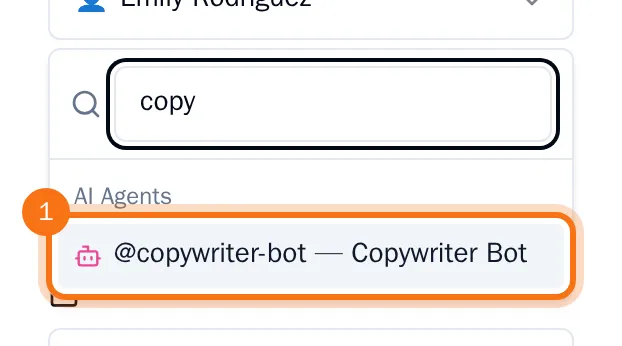
The agent starts at once. Below the field you see what it is doing: queued, working and for how long, and when it is done. When it finishes, its reply appears in the task's comments, and the files it made are saved on the task.

An agent can stop and wait for a person's approval, for example before it sends something outside OKiDO. The line below the field then says it needs approval.
Mention an agent in a comment
In a comment, type @ and the first letters of the agent's name, choose the agent and add the comment. The agent reads the comment and replies in the comments, the same way as when you assign it the task. See Comment, mention people and check activity.
Follow the AI work on a task
- Open the task and choose the AI work tab. The number on the tab shows how many runs and files there are.
Each run shows its status, the agent, when it ran and who asked. Below a run you see the actions that needed approval, with who approved or rejected them and when, and the files the agent made. Choose Open run to see the whole run under AI, and a file's name to open it.
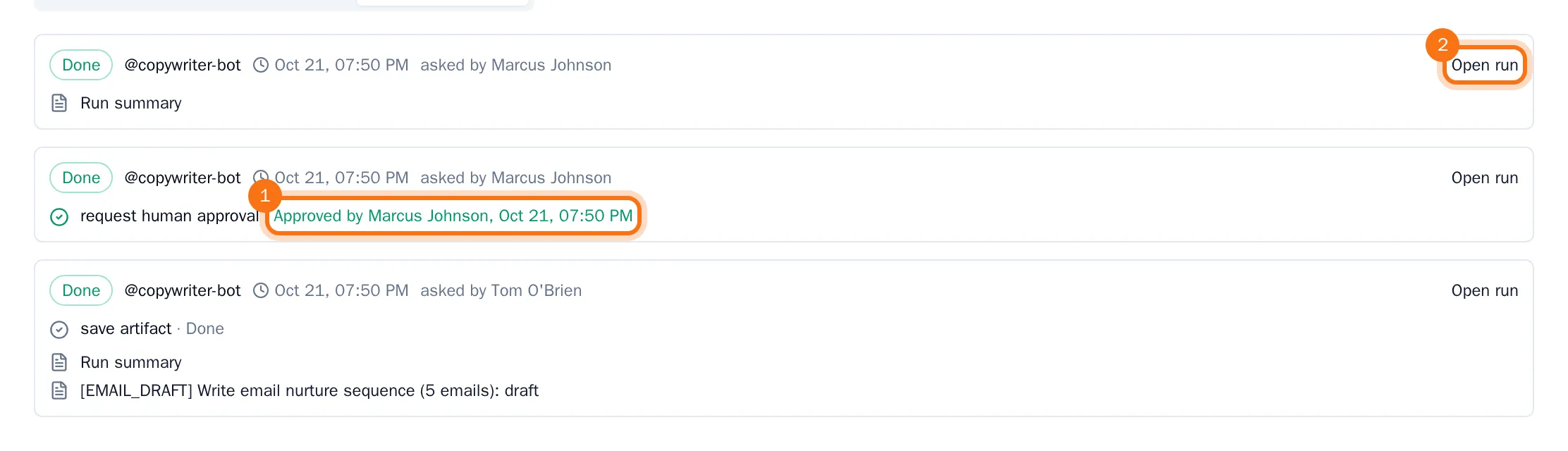
Opening runs and files needs the Advanced AI features: owners and admins have them, and members get them from an owner or admin (see Change a member's role or Advanced AI access).