Choose AI models
Pick the AI model your organization uses for chats, for agents at work and for agents started from an AI assistant.
Who can do this: Owner, Admin
OKiDO's AI uses a model for each purpose: chats, agents at work, and agents started from an MCP client. You can choose which model your organization uses for each one.
Only owners and admins can change these settings. Which models you can choose depends on your plan.
Choose the default models
- In the menu on the left, choose Organization, then the AI Models tab.
- Under Default AI Models, pick a model in the list next to a purpose.
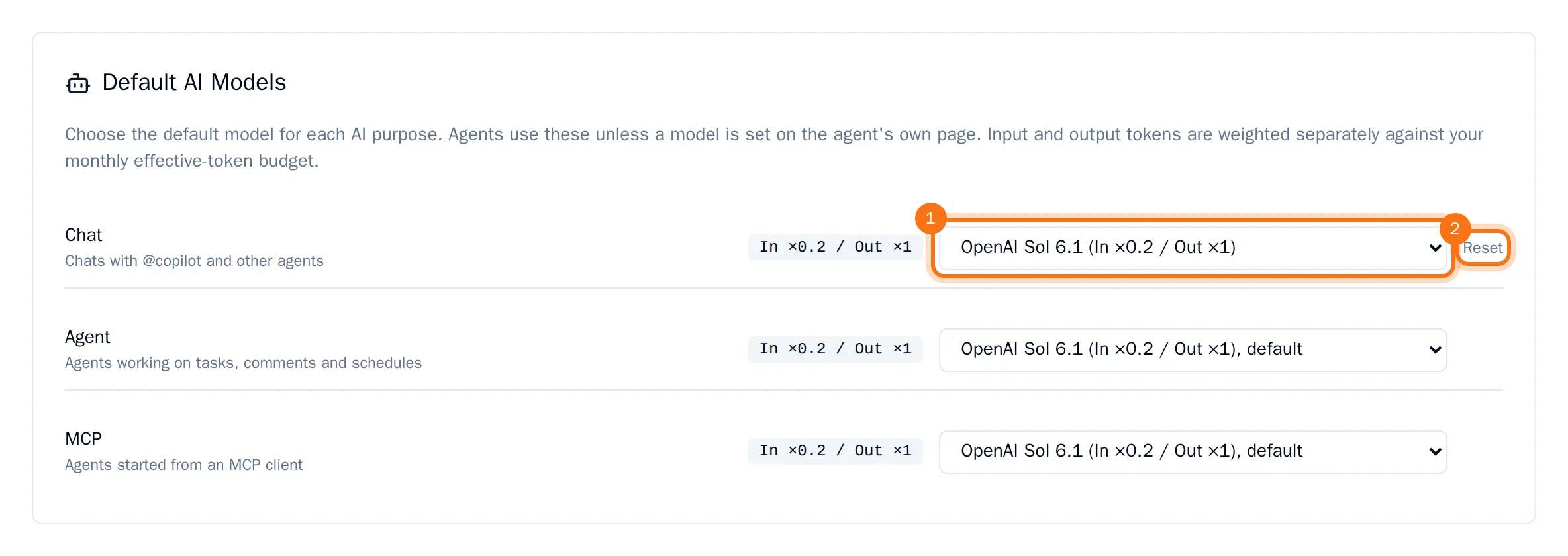
The new model is saved right away. Agents use these defaults unless a model is set on the agent's own page.
Next to each model you see how its tokens count against your monthly token budget. For example, "In ×0.2 / Out ×1" means that a token the model reads counts for a fifth, and a token it writes counts in full. To go back to the model OKiDO recommends, choose Reset.