Assign steps to teams and AI agents
Decide who does each step of an SOP: a team, or an AI agent that carries the step out on its own.
Who can do this: Everyone in the organization
Each step of an SOP template can say who does it. Give a step to a team, and it lands with someone of that team in every run. Give it to an AI agent, and the agent does the step by itself when a run gets there, such as a QA agent that checks a deliverable for accessibility.
To change a template you need permission to edit it: owners and admins always have it, members when their team has full access to the folder (see Give teams access to a folder).
Give a step to a team
- Open the SOP template and choose the step in the list on the left.
- Under Assign to Team, choose the team.

The change is saved a moment later. When a run is created, the step is assigned to the first member of the team. Choose No team assigned to take the team off the step again.
Give a step to an AI agent
- Choose the step in the list on the left.
- Under AI Agent, choose the agent.
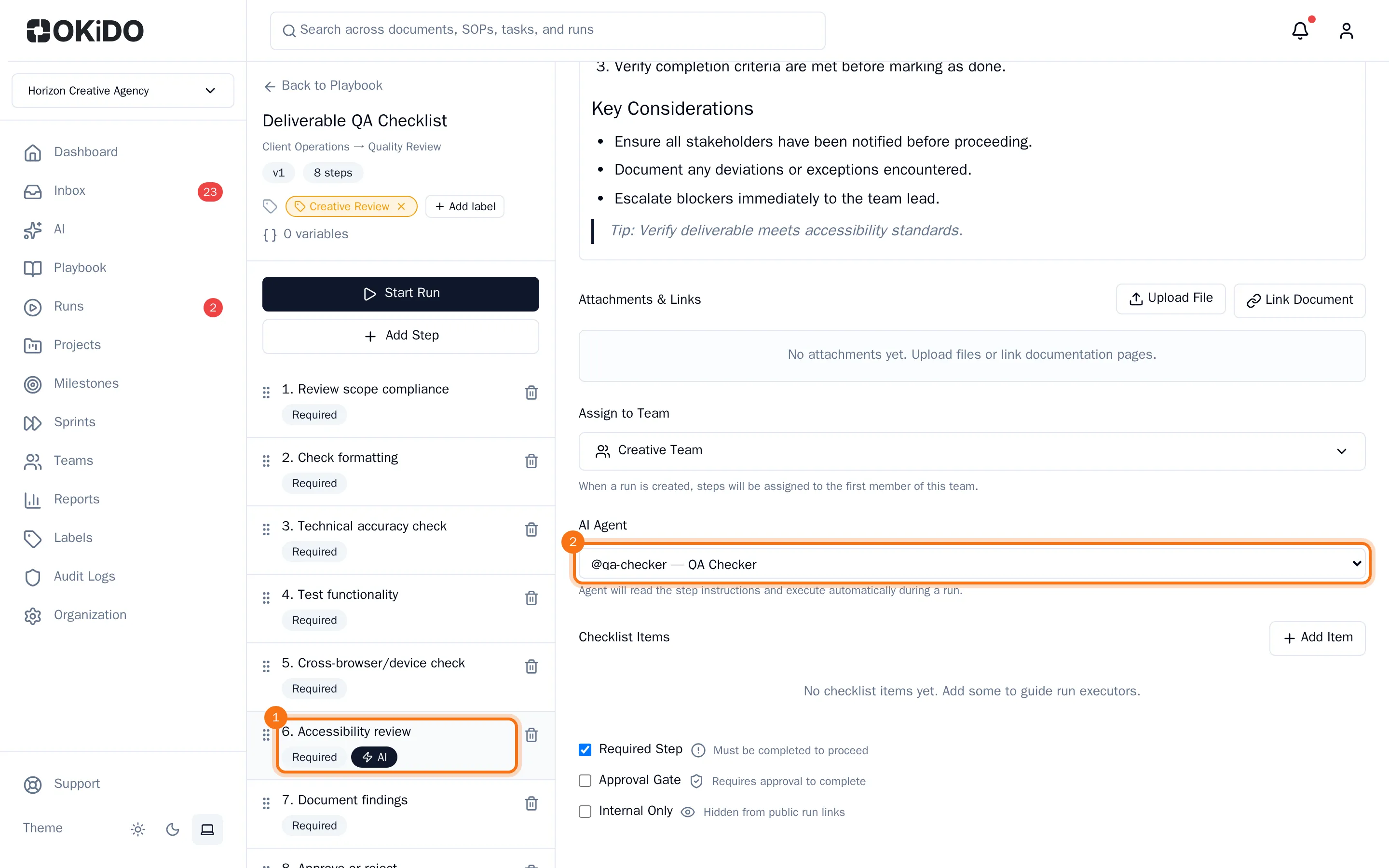
The step gets an AI label in the list. In a run, the agent reads the step's instructions and carries the step out on its own. Choose No agent assigned to give the step back to people.
Tip: Write clear instructions in the step for an agent: it follows them as written. See Create an SOP template.